- 集成指南
- 支持的功能(安全)
- RuPay 付款人身份验证
- 使用身份验证 API 实施 RuPay 身份验证
使用身份验证 API 实现 RuPay 身份验证
此页内容介绍如何使用身份验证 API 集成到网关以使用 RuPay 身份验证。
RuPay 身份验证流程
下图说明了使用 RuPay PaySecure 对付款人进行身份验证的付款的身份验证流程。
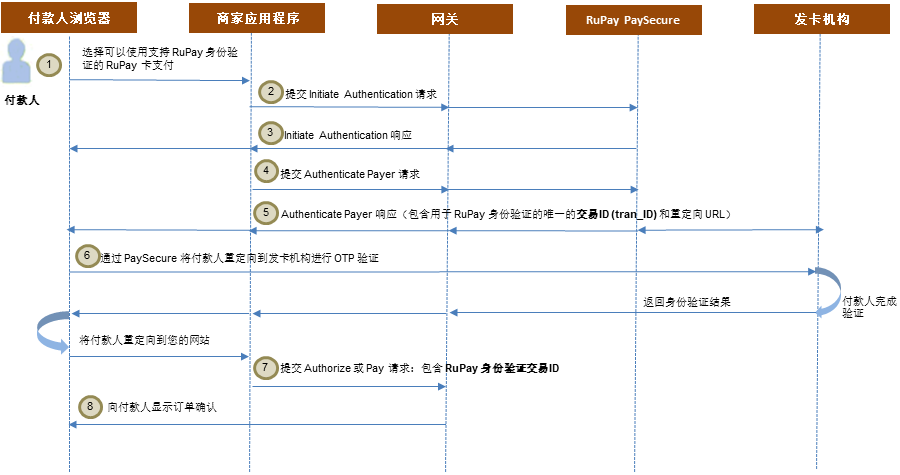
成功的 RuPay 身份验证的身份验证流如下所示:
- 付款人浏览您的购物网站,选择一件或多件产品,进入付款页,选择使用支持 RuPay PaySecure 的 RuPay 卡付款。
- 发起身份验证: 您要求网关向 RuPay PaySecure 确认该卡是否符合进行 RuPay 付款人身份验证的条件。
- 如果付款人的 RuPay 身份验证可用,网关将在响应中返回身份验证详细信息。
- 对付款人进行身份验证: 您要求网关执行发起的身份验证。 当付款人单击结账页面的“立即付款”按钮时调用此项。
- 网关在 Authenticate Payer 响应中返回来自 RuPay PaySecure 的重定向 URL 和 RuPay 身份验证交易 ID。
- 您将付款人的 Web 浏览器重定向到发卡机构,付款人在那里验证其 OTP。 发卡机构将身份验证结果返回到网关。 网关将付款人直接重定向到您的网站。
- 在付款操作中使用 RuPay 身份验证交易 ID: 您提交付款进行处理。
- 您向付款人显示订单确认页。
集成以使用 RuPay 付款人身份验证
此部分介绍如何集成到网关以使用 RuPay 付款人身份验证。
步骤 1: 发起身份验证
Initiate Authentication 操作用于确定商家是否可以为给定卡使用 RuPay 付款人身份验证。 如果卡类型为 RuPay,网关将确定 RuPay 卡 BIN 是否拥有进行电子商务交易的资格。
Initiate Authentication API 参考 [REST] [NVP]
您可以通过在 Initiate Authentication 请求中提供以下字段来发起 RuPay 身份验证:
- session.id、sourceOfFunds.provided.card 或 sourceOfFunds.token: 用于付款的卡的详细信息
- order.currency: 订单货币。
- transaction.id: 此支付身份验证的唯一识别码。
- order.id: 此订单的唯一识别码。
如果 RuPay 付款人身份验证可用,网关将返回 authentication.version=RUPAY,以及以下字段:
response.gatewayCodetransaction.authenticationStatus: 提供更多有关身份验证状态的详细信息。resultresponse.gatewayRecommendation
要确定下一步,请查看 response.gatewayRecommendation 字段中提供的网关建议。
response.gatewayRecommendation |
下一步 |
|---|---|
| PROCEED | 您可以使用 Authenticate Payer 操作继续对付款人进行身份验证。 |
| RESUBMIT_WITH_ALTERNATIVE_PAYMENT_DETAILS | 向付款人询问备用付款详细信息(例如,新卡或另一个付款方式),然后使用新详细信息重新提交请求。 不要重新提交相同的请求。 |
下表显示了各种 Rupay 身份验证场景的 Initiate Authentication 响应。
| 状态 | response.gatewayRecommendation |
transaction.authenticationStatus |
response.gatewayCode |
result |
|---|---|---|---|---|
|
PROCEED | AUTHENTICATION_AVAILABLE | AUTHENTICATION_IN_PROGRESS | SUCCESS |
|
RESUBMIT_WITH_ALTERNATIVE_PAYMENT_DETAILS | AUTHENTICATION_NOT_SUPPORTED | DECLINED | FAILURE |
|
RESUBMIT_WITH_ALTERNATIVE_PAYMENT_DETAILS | AUTHENTICATION_UNAVAILABLE | DECLINED | FAILURE |
|
RESUBMIT_WITH_ALTERNATIVE_PAYMENT_DETAILS | AUTHENTICATION_NOT_SUPPORTED | DECLINED | FAILURE |
|
RESUBMIT_WITH_ALTERNATIVE_PAYMENT_DETAILS | AUTHENTICATION_UNAVAILABLE | DECLINED | FAILURE |
| URL | https://na.gateway.mastercard.com/api/rest/version/72/merchant/{merchantId}/order/{orderid}/transaction/{RuPayAuthId} |
| HTTP 方法 | PUT |
{
    "apiOperation": "INITIATE_AUTHENTICATION",
    "order": {
        "currency": "INR"
    },

    "sourceOfFunds": {

        "provided": {

            "card": {

                "number": "6074829900004946"
            }
        }
    }
}
{
    "authentication": {
        "version": "RUPAY"
    },
    "merchant": "TESTMERCHANT",
    "order": {
        "authenticationStatus": "AUTHENTICATION_AVAILABLE",
        "creationTime": "2019-06-12T07:42:39.070Z",
        "currency": "INR",
        "id": "802014086",
        "merchantCategoryCode": "5411",
        "status": "AUTHENTICATION_INITIATED",
        "totalAuthorizedAmount": 0,
        "totalCapturedAmount": 0,
        "totalRefundedAmount": 0
    },
    "response": {
        "gatewayCode": "AUTHENTICATION_IN_PROGRESS",
        "gatewayRecommendation": "PROCEED"
    },
    "result": "SUCCESS",
    "sourceOfFunds": {
        "provided": {
            "card": {
                "number": "607484xxxxxx4936",
                "scheme": "RUPAY"
            }
        },
        "type": "CARD"
    },
    "timeOfRecord": "2019-06-12T07:42:39.070Z",
    "transaction": {
        "amount": 0,
        "authenticationStatus": "AUTHENTICATION_AVAILABLE",
        "currency": "INR",
        "id": "8286737",
        "type": "AUTHENTICATION"
    },
    "version": "72"
}
步骤 2: 对付款人进行身份验证
如果 Initiate Authentication 响应已指示可对 RuPay 卡进行身份验证 (authentication.version=RUPAY),您可以提交 Authenticate Payer 请求。 您应该在付款人点击结账页面的“立即付款”按钮时调用此项。
Authenticate Payer 操作可以安全地在您的收单银行和 RuPay PaySecure 之间交换必要的信息,包括卡号。 PaySecure 返回唯一的交易 ID (tran_ID),可用于后续的 Authorization 或 Pay 操作。
Authenticate Payer API 参考 [REST] [NVP]
您必须通过提供以下强制字段来提交此操作:
- order.id: 与之前的 Initiate Authentication 操作相同的 order.id。
- transaction.id: 与之前的 Initiate Authentication 操作相同的 transaction.id。
- order.amount: 订单总额。
- order.currency: 订单货币。
- session.id、sourceOfFunds.provided.card 或 sourceOfFunds.token: 用于付款的卡的详细信息。
- authentication.redirectResponseUrl: 您希望在完成付款人身份验证流程后将付款人重定向到的 URL。
- device.browserDetails.acceptHeaders: 从付款人的浏览器发送的 Accept 请求标头字段的内容。 用于确定浏览器支持哪些内容类型。
- device.ipAddress: 付款人使用的设备 IP 地址,采用 IPv4 nnn.nnn.nnn.nnn 格式。 不支持 IPv6 格式。
Authenticate Payer 将返回以下字段:
response.gatewayCodetransaction.authenticationStatus: 提供更多有关身份验证状态的详细信息。authentication.payerInteraction: 指示是否使用了付款人交互来完成身份验证流程。resultauthentication.redirect.html: 用于创建身份验证 UI 的代码。 请将此内容写入作为付款页面的<BODY>中的最后一个元素的空<DIV>元素。response.gatewayRecommendation
要确定下一步,请查看 response.gatewayRecommendation 字段中提供的网关建议。
response.gatewayRecommendation |
下一步 |
|---|---|
| PROCEED | 您可以通过允许付款人响应发卡机构请求的 OTP 身份验证来继续完成身份验证流程。 |
| DO_NOT_PROCEED_ABANDON_ORDER | 不要再次提交相同的请求。 支付服务提供商、组织或发卡机构要求您放弃订单。 |
| RESUBMIT_WITH_ALTERNATIVE_PAYMENT_DETAILS | 向付款人询问备用付款详细信息(例如,新卡或另一个付款方式),然后使用新详细信息重新提交请求。 不要重新提交相同的请求。 |
如果网关建议您 PROCEED,则将 authentication.redirect.html 响应字段的内容粘贴到显示给付款人的页面中。
下表显示了各种 Rupay 身份验证场景的 Initiate Authentication 响应。
| 状态 | response.gatewayRecommendation |
transaction.authenticationStatus |
authentication.payerInteraction |
response.gatewayCode |
result |
|---|---|---|---|---|---|
|
PROCEED | AUTHENTICATION_PENDING | REQUIRED | PENDING | PENDING |
|
DO_NOT_PROCEED_ABANDON_ORDER | AUTHENTICATION_REJECTED | NOT_REQUIRED | DECLINED | FAILURE |
|
RESUBMIT_WITH_ALTERNATIVE_PAYMENT_DETAILS | AUTHENTICATION_UNAVAILABLE | NOT_POSSIBLE | DECLINED | FAILURE |
|
RESUBMIT_WITH_ALTERNATIVE_PAYMENT_DETAILS | AUTHENTICATION_UNAVAILABLE | NOT_POSSIBLE | DECLINED | FAILURE |
|
RESUBMIT_WITH_ALTERNATIVE_PAYMENT_DETAILS | AUTHENTICATION_UNAVAILABLE | NOT_POSSIBLE | DECLINED | FAILURE |
|
RESUBMIT_WITH_ALTERNATIVE_PAYMENT_DETAILS | AUTHENTICATION_UNAVAILABLE | NOT_POSSIBLE | DECLINED | FAILURE |
OTP 身份验证
网关将付款人的浏览器重定向到发卡机构的 OTP 验证 UI(使用 authentication.redirect.html),在那里,系统将提示付款人输入有效的 OTP(在付款人被重定向回您的网站之后)。 在付款人的浏览器返回到您的网站后,以下字段将在回调中返回。
- order.id
- transaction.id
- result
- response.gatewayRecommendation
您可以使用 response.gatewayRecommendation 字段中返回的值来确定身份验证结果。
response.gatewayRecommendation |
下一步 |
|---|---|
| PROCEED | 您可以继续处理付款,因为同意进行身份验证。 如果对付款的授权成功,继续过账资金,如果适用,则发货。 |
| RESUBMIT_WITH_ALTERNATIVE_PAYMENT_DETAILS | 向付款人询问备用付款详细信息(例如,新卡或另一个付款方式),然后使用新详细信息重新提交请求。 不要重新提交相同的请求。 |
在从 OTP 身份验证中检索结果后,网关会更新 Authentication Payer 响应字段。
| 状态 | response.gatewayRecommendation |
transaction.authenticationStatus |
authentication.payerInteraction |
response.gatewayCode |
result |
|---|---|---|---|---|---|
|
PROCEED | AUTHENTICATION_SUCCESSFUL | REQUIRED | APPROVED | SUCCESS |
|
RESUBMIT_WITH_ALTERNATIVE_PAYMENT_DETAILS | AUTHENTICATION_FAILED | REQUIRED | DECLINED | FAILURE |
| URL | https://na.gateway.mastercard.com/api/rest/version/72/merchant/{merchantId}/order/{orderid}/transaction/{RuPayAuthId} |
| HTTP 方法 | PUT |
{
    "apiOperation": "AUTHENTICATE_PAYER",
    "order": {
        "amount": "33.00",
        "currency": "INR"
    },
    "sourceOfFunds": {
        "provided": {
            "card": {
                "number": "6074849900004936",
                "expiry": {
                    "month": "01",
                    "year": "39"
                },
                "securityCode": "111"
            }
        }
    },
    "device": {
        "ipAddress": "103.14.160.193",
        "browser": "MOZILLA/4.0 (COMPATIBLE; MSIE 5.0; WINDOWS 95)",
        "browserDetails": {
            "acceptHeaders": "text/html,application/xhtml+xml,application/xml;q=0.9,*/*;q=0.8"
        }
    },
    "authentication": {
        "redirectResponseUrl": "<host>/merchantSimulator/jsp/simple/output.jsp"
    }
}
{
    "authentication": {
        "method": "DYNAMIC",
        "payerInteraction": "REQUIRED",
        "redirectHtml": "document.getElementById('redirectToNpciForm').submit();",
        "version": "RUPAY"
    },
    "merchant": "TESTMERCHANT",
    "order": {
        "authenticationStatus": "AUTHENTICATION_PENDING",
        "creationTime": "2019-06-12T07:53:52.190Z",
        "currency": "INR",
        "id": "983684879",
        "merchantCategoryCode": "5411",
        "status": "AUTHENTICATION_INITIATED",
        "totalAuthorizedAmount": 0,
        "totalCapturedAmount": 0,
        "totalRefundedAmount": 0
    },
    "response": {
        "gatewayCode": "PENDING",
        "gatewayRecommendation": "PROCEED"
    },
    "result": "PENDING",
    "sourceOfFunds": {
        "provided": {
            "card": {
                "expiry": {
                    "month": "1",
                    "year": "39"
                },
                "number": "607484xxxxxx4936",
                "scheme": "RUPAY"
            }
        },
        "type": "CARD"
    },
    "timeOfRecord": "2019-06-12T07:53:52.190Z",
    "transaction": {
        "acquirer": {
            "merchantId": "TESTMERCHANT"
        },
        "amount": 33,
        "authenticationStatus": "AUTHENTICATION_PENDING",
        "currency": "INR",
        "id": "745991098",
        "type": "AUTHENTICATION"
    },
    "version": "72"
}
步骤 3: 在付款操作中使用身份验证结果
当 Authenticate Payer 操作的结果指示您可以继续处理付款时 (response.gatewayRecommendation=PROCEED),您可以发起 Authorize 或 Pay 操作。 除了标准字段外,您还必须提供以下字段:
- order.id: 提供您在 Initiate Authentication 和 Authenticate Payer 操作中提供的 order.id。
- authentication.transactionId: 提供您在 Initiate Authentication 和 Authenticate Payer 操作中提供的 transaction.id。 您无需在身份验证参数组中包括任何字段,因为当您要求执行身份验证时,网关将使用 authentication.transactionId 查找存储的身份验证结果。 网关将需要的信息传送到收单行。
Authentication Transaction ID API 参考 [REST] [NVP]
| URL | https://na.gateway.mastercard.com/api/rest/version/72/merchant/{merchantId}/order/{orderid}/transaction/{transactionid} |
| HTTP 方法 | PUT |
{
      "apiOperation":"PAY",
      "order":{
         "amount":"100",
         "currency":"INR"
     },
     "sourceOfFunds":{
         "provided":{
            "card":{
               "expiry":{
                  "month":"01",
                  "year":"39"
               },
               "number":"6074819900004939",
               "securityCode":"111"
            }
         },
         "type":"CARD"
      },
         "authentication": {
           "transactionId":"8286737"
       }
   }
	{
        "authentication": {
            "transactionId": "471707320"
        },
        "authorizationResponse": {
            "transactionIdentifier": "500000000000000000000002347854"
        },
        "gatewayEntryPoint": "WEB_SERVICES_API",
        "merchant": "TESTMERCHANT",
        "order": {
            "amount": 100.00,
            "chargeback": {
                "amount": 0,
                "currency": "INR"
            },
            "creationTime": "2019-07-03T09:08:28.309Z",
            "currency": "INR",
            "id": "802014086",
            "merchantCategoryCode": "4511",
            "status": "CAPTURED",
            "totalAuthorizedAmount": 100.00,
            "totalCapturedAmount": 100.00,
            "totalRefundedAmount": 0.00
        },
        "response": {
            "acquirerCode": "00",
            "acquirerMessage": "Success",
            "gatewayCode": "APPROVED"
        },
        "result": "SUCCESS",
        "sourceOfFunds": {
            "provided": {
                "card": {
                    "brand": "RUPAY",
                    "expiry": {
                        "month": "1",
                        "year": "39"
                    },
                    "fundingMethod": "DEBIT",
                    "issuer": "DMBB9990001",
                    "number": "607481xxxxxx4939",
                    "scheme": "RUPAY",
                    "storedOnFile": "NOT_STORED",
                    "tags": "{\"RUPAY_BIN_STATUS_FLAG\":\"ACTIVE\",\"RUPAY_BIN_MESSAGE_TYPE\":\"SMS\"}"
                }
            },
            "type": "CARD"
        },
        "timeOfRecord": "2019-07-03T09:08:28.309Z",
        "transaction": {
            "acquirer": {
                "id": "<acquirer_id>",
                "merchantId": "423555234334123"
            },
            "amount": 100.00,
            "authorizationCode": "143835",
            "currency": "INR",
            "frequency": "SINGLE",
            "id": "108379916",
            "receipt": "918409000035",
            "source": "INTERNET",
            "terminal": "88011019",
            "type": "PAYMENT"
        },
        "version": "72"
    }